relay-crm-mcp
Relay

An MCP server that connects Claude to a Salesforce org, so a sales rep can ask for account context in plain English (“who should I call today, and what happened last time?”) instead of clicking through records.
Relay gives Claude five tools: four that read (account search, account briefing, open pipeline, connection check) and one carefully fenced write (log a call note). It ships with a seed script that fills a free Salesforce Developer Edition org with 50 fictional accounts, so the whole thing can be tried safely.
All data is fictional and generated by the seed script. Relay is an independent portfolio project. It is not affiliated with, endorsed by, or built from the data of any employer.
How it works
flowchart LR
    U[Sales rep] -->|plain English| C[Claude Desktop]
    C <-->|MCP over stdio| R[Relay server<br/>Python]
    R -->|OAuth 2.0 Client Credentials| T[Salesforce token endpoint]
    R -->|REST API: SOQL queries, create Task| S[(Salesforce<br/>Developer Edition org)]
    subgraph Guardrails inside Relay
      V[Input validation<br/>and SOQL escaping]
      G[Write guardrail:<br/>demo accounts only]
    end
    R --- V
    R --- G
- You ask Claude something like “Summarize the Brookside account before my call.”
- Claude picks a Relay tool and calls it over MCP (local stdio, nothing is exposed to the network).
- Relay validates the input, runs read-only SOQL against Salesforce, and returns tidy JSON.
- Claude turns that into a short briefing, including flags such as “renewal in 38 days”.
Roadmap: web workspace (design in progress)
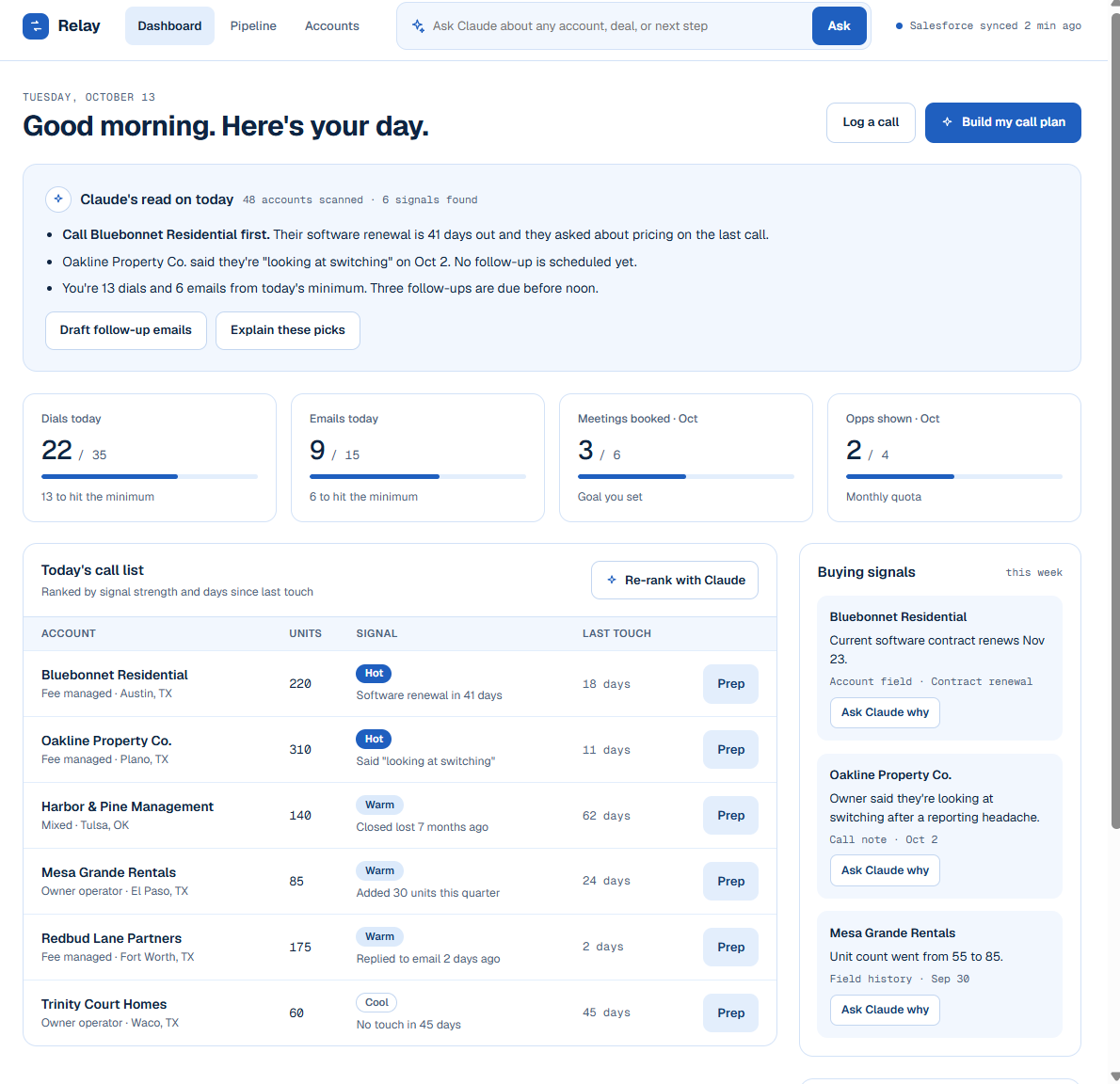
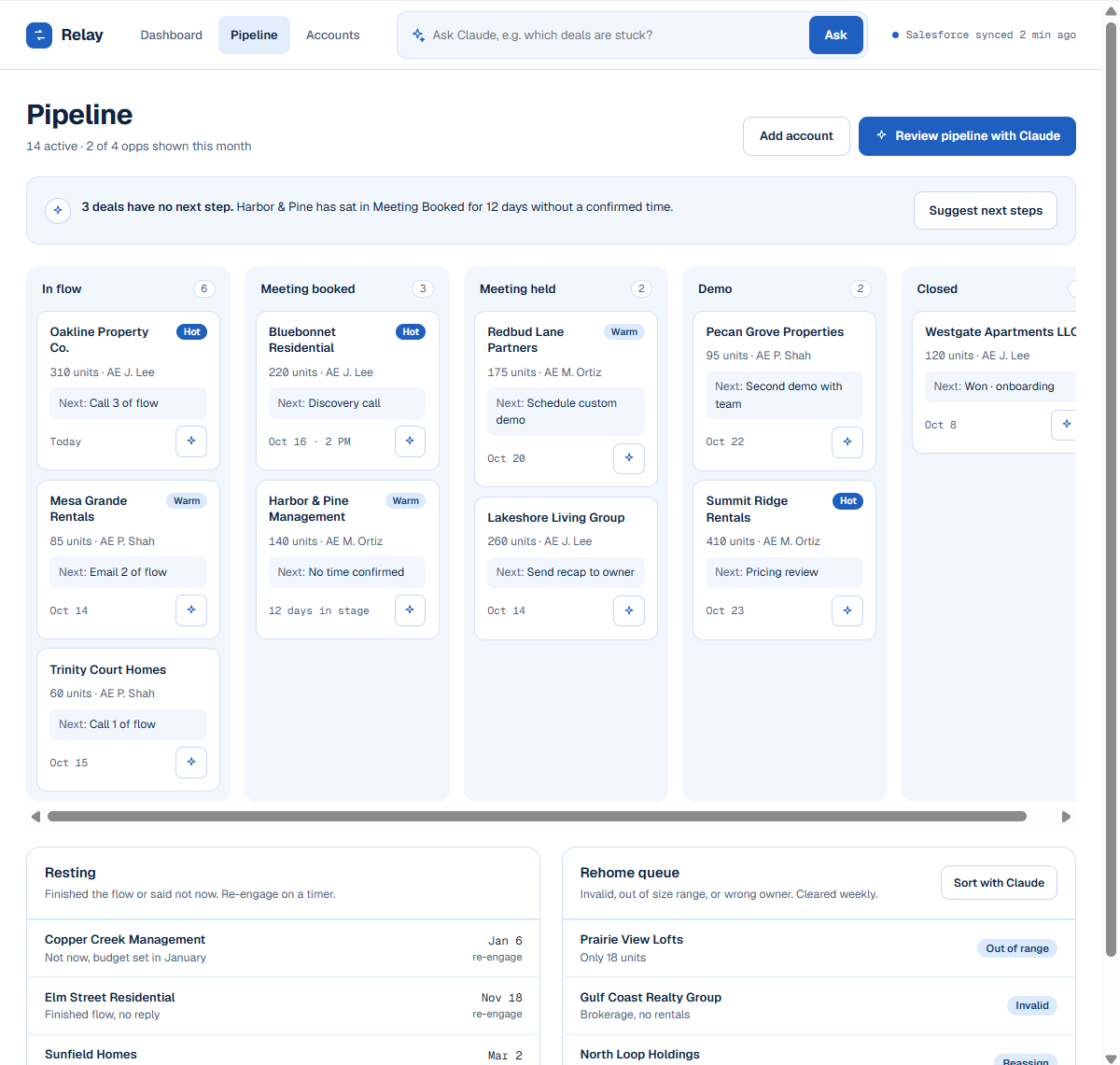
The five tools above are built and working. Next is a small web workspace on the same Salesforce data: a dashboard of what to work today, a pipeline board by BDR status, and an account page with a pre-call brief. The screenshots below are design mockups with sample data, not a working app yet.
| Dashboard | Pipeline | Account prep |
|---|---|---|
 |
 |
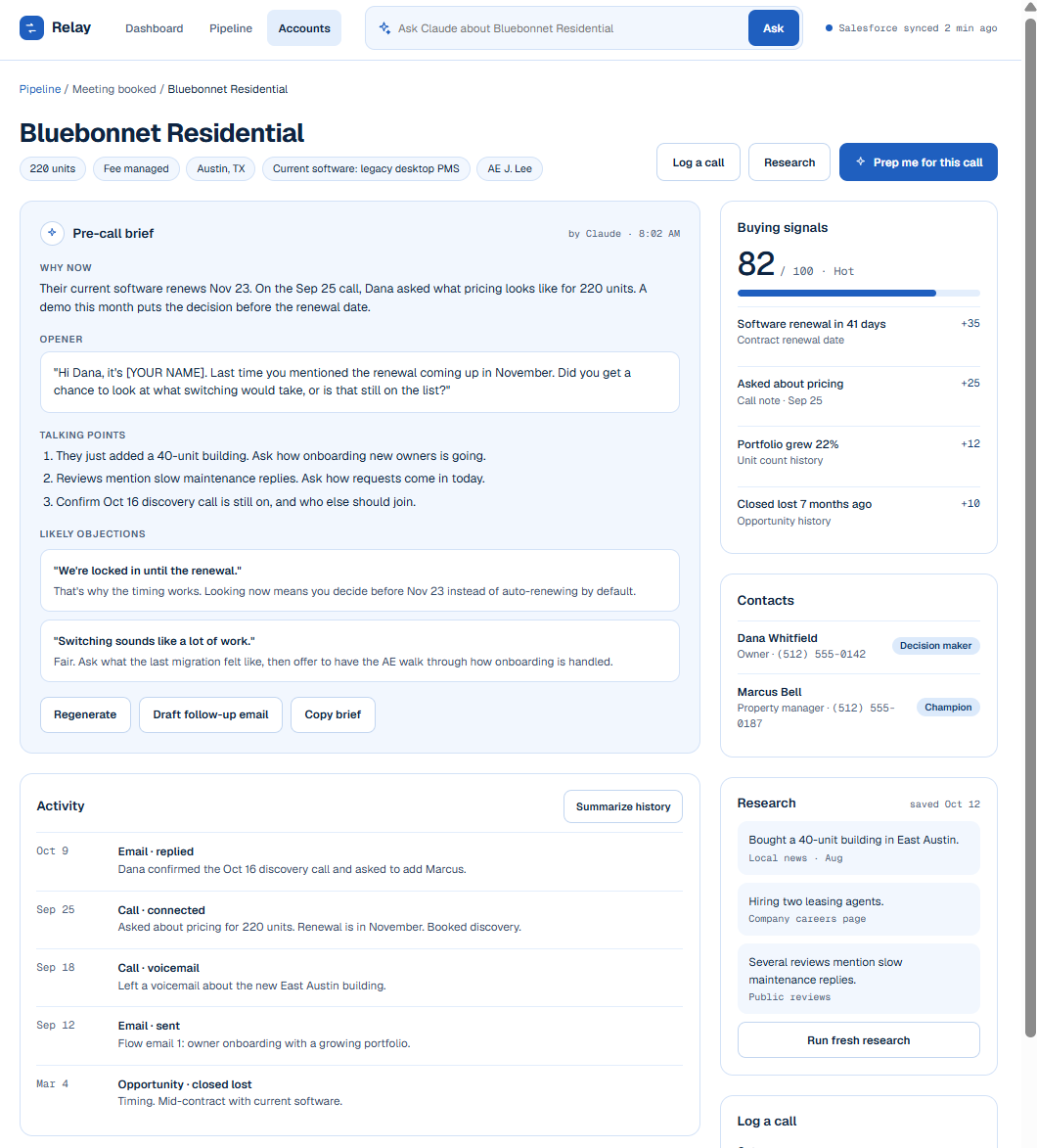 |
Mockups only: hard-coded sample data, no Salesforce connection.
Tools
| Tool | Reads or writes | What it does | Salesforce calls |
|---|---|---|---|
check_salesforce_connection |
Read | Org name and type, API calls left today, and any setup still missing (custom fields, deal stages). Run this first if anything fails. | query (Organization), limits, describe (Account, Opportunity) |
find_account |
Read | Search by part of the name and/or filter by BDR status, tier, portfolio type, unit range, or renewal window. Returns Ids and a more_available flag. Max 50 rows. |
query (Account) |
summarize_account |
Read | One-call briefing: account details, contacts, open and past deals, recent call history, plus computed signals (renewal soon, long idle, re-engage date reached, open deal past close date, Active Opp with no open deal). | query x4 (Account, Contact, Opportunity, Task) |
list_open_deals |
Read | Open opportunities, soonest close date first, with a pipeline total and a per-stage breakdown. Optional account and stage filters. | query (Opportunity) |
log_note |
Write | Logs a completed Task (call or activity note) on an account, optionally tied to a contact. | query (Account, Contact), sobjects/Task create |
Read tools are marked read_only_hint = true and the write tool is marked non-destructive, so
Claude Desktop can ask for confirmation appropriately.
Example prompts
- “Find my Tier 1 accounts that are renewing in the next 60 days.”
- “Which accounts are Resting and ready to be re-engaged?”
- “Summarize the Maple Ridge account before my call.”
- “What’s in my open pipeline, by stage?”
- “Log a note on that account: spoke with the owner, wants a demo next week.”
Data model
Relay expects a standard Salesforce org plus a few custom fields on Account and three
custom Opportunity stages. relay-check tells you exactly what is missing.
| Account field | Type | Used for |
|---|---|---|
Units__c |
Number | Portfolio size, tier filter |
Portfolio_Type__c |
Picklist | Filtering |
Current_Software__c |
Text | Competitive context |
Contract_Renewal_Date__c |
Date | Renewal signals |
Account_Tier__c |
Picklist (1 to 4) | Prioritization |
BDR_Status__c |
Picklist (New, In Flow, Resting, Rehome, Active Opp) | Pipeline stage |
Re_engage_Date__c |
Date | Resting accounts |
Rehome_Reason__c |
Picklist | Why an account was rehomed |
Opportunity stages: Meeting Booked, Meeting Held, Demo (plus the built-in Closed Won / Closed Lost).
Setup
You need a free Salesforce Developer Edition org, uv, and Claude Desktop.
1. Salesforce side (once)
- Create the custom fields and stages from the data model above.
- Setup > External Client App Manager > create an app, enable OAuth, tick Client Credentials
Flow, and give it the
apiscope. - In the app’s policies, set a Run As user (use a dedicated user, not your admin, if you can).
- Copy the Consumer Key and Consumer Secret, and note your My Domain URL
(Setup > My Domain, ends in
.my.salesforce.com).
2. Local side (Windows, PowerShell)
uv sync
Copy-Item .env.example .env      # then fill in the three Salesforce values
uv run relay-check               # should end with all [ok]
uv run pytest                    # 62 tests, no Salesforce needed
If uv sync fails with a hardlink error (os error 396), your project is probably inside
OneDrive. Move it out, or run $env:UV_LINK_MODE = "copy" first.
3. Load the fake data
uv run relay-seed --dry-run      # shows what would be created, changes nothing
uv run relay-seed                # creates the demo data
| Option | What it does |
|---|---|
--dry-run |
Print the plan only |
--reset |
Delete existing demo data, then create fresh data |
--clean |
Delete demo data and stop |
--count N |
Number of accounts, 5 to 200 (default 50) |
--yes |
Skip the delete confirmation |
--allow-non-dev |
Override the Developer Edition check (not recommended) |
The seed is deterministic (fixed random seed), so everyone gets the same 50 accounts: 10 New, 15 In Flow, 8 Resting, 5 Rehome, 12 Active Opp, each with contacts and a call history. It creates records through the sObject Collections endpoint in batches of 200.
4. Connect Claude Desktop
Settings > Developer > Edit Config, then add (use double backslashes on Windows):
{
  "mcpServers": {
    "relay-crm": {
      "command": "uv",
      "args": ["--directory", "C:\\path\\to\\relay-crm-mcp", "run", "relay-server"]
    }
  }
}
Restart Claude Desktop completely, then ask: “Check my Salesforce connection.”
Security
- Secrets stay local. Credentials live only in
.env, which is git-ignored. They are never printed, logged, or returned to Claude. The server logs to stderr only, because stdout carries the MCP protocol. - Injection-safe queries. Every value that reaches SOQL is escaped,
LIKEwildcards are escaped, Ids must match the 15 or 18 character Salesforce format, and picklist filters are checked against a whitelist. - One narrow write.
log_notecan only create a Task. It refuses any account whoseAccountNumberdoes not start withRELAY-(the seed script’s marker), caps the subject at 200 and the note at 4,000 characters, verifies that a given contact belongs to the account, and stamps every note “Logged via Relay (Claude)” so it is easy to audit. - Seed script safeguards. It refuses to run in anything but a Developer Edition org unless
you pass
--allow-non-dev, only ever deletes records carrying theRELAY-marker, asks before deleting, and deletes children before parents. - Readable failures. Expected problems (bad input, bad credentials, a refused write) come
back as
{"ok": false, "error": "..."}so Claude can tell you what to fix instead of showing a generic error. - For real use, point the Run As user at a dedicated, low-permission Salesforce user so the API can only do what that user is allowed to do.
Known limits
- Built and tested against a Developer Edition org with fictional data, not a production org.
- Single org, single user. There is no per-user OAuth login; all calls run as the Run As user.
find_accountandlist_open_dealsreturn at most 50 rows per call.- The
RELAY-write guardrail is deliberate. Usinglog_noteon real accounts means changing that rule on purpose. - Field names (
BDR_Status__cand so on) are specific to this project’s data model. - Developer Edition orgs can be reclaimed after about 45 days of inactivity, so log in now and then if you want to keep yours.
- Tools never delete or edit existing records. The only deletes are inside the seed script.
Project structure
src/relay/
  server.py         MCP server: tool registration, error handling
  tools.py          Tool logic (validation, SOQL, signals); takes any client with query()/create()
  salesforce.py     Salesforce client: OAuth, retry on expired session, batch create/delete
  seed.py           relay-seed command
  seed_data.py      Deterministic fake data generator
  check_connection.py   relay-check command
  config.py         .env loading and validation
  constants.py      Shared picklist values and field names
tests/              62 tests: logic, seed script, client, and the real server over stdio
Development
uv run pytest        # tests
uv run ruff check .  # lint
The tests use in-memory fakes of Salesforce, so they run offline and never touch a real org. One test starts the real server as a subprocess and talks to it over stdio the same way Claude Desktop does.
License
MIT